Zu Produktinformationen springen
1 von 19
AerolinkGear

AerolinkGear 2-in-1 RJ45 & DC Wall Pass-Through for Starlink Mini

AerolinkGear 2-in-1 RJ45 & DC Wall Pass-Through for Starlink Mini

SKU: E07-MN

Normaler Preis $42.00 USD
Verkaufspreis $42.00 USD
BLACK FRIDAY 20% OFF SITEWIDE

Auf Lager

Choose Your Setup: Starlink Mini - Panel Port

Built for Starlink Mini Setups

AerolinkGear focuses on practical Starlink Mini accessories for mobile internet, RV travel, camping, overlanding, remote work, and backup internet setups. Check the product images, variant name, and specifications to confirm the right fit for your setup.

Choose the Right Gear for Your Use Case

Choose power banks and battery stands for off-grid runtime, mounts for stable positioning, cables and adapters for cleaner power connections, and cases or covers for travel protection. If you are building a full kit, match your gear to where and how you use Starlink Mini.

Need Help Before You Buy?

Not sure which Starlink Mini accessory fits your setup? Contact info@aerolinkgear.com before checkout and we can help confirm compatibility. Orders include tracking after shipment, and eligible items can be returned or exchanged within 30 days of delivery.

2-IN-1 PANEL CONNECTION

Route data and DC power through one clean wall opening.

Bring an RJ45 Ethernet connection and a 5.5 x 2.1 mm DC power path through an RV, van, boat, cabin, or equipment panel without leaving cables pinched in a window or door.

Data portShielded RJ45 Cat6 pass-through
Power portDC 5.5 x 2.1 mm pass-through
HousingBlack CNC aluminum
Faceplate64 x 64 mm / 2.51 x 2.51 in
AerolinkGear RJ45 and DC wall pass-through connection for Starlink Mini and compatible satellite internet setups

CHOOSE YOUR SETUP

Match the kit to your Starlink hardware.

Each option uses the same weather-conscious panel port, but the included connection parts and the role of the DC port are different.

Starlink Mini - Panel PortData + DC

For Starlink Mini owners who already have the compatible indoor and outdoor cables needed for their installation.

  • Includes one RJ45 + DC panel port and mounting hardware.
  • Passes Ethernet data and 5.5 x 2.1 mm DC power through the panel.
  • It does not convert voltage or include extension cables.
Starlink Gen 2 - Ethernet KitData only

For adding a wired wall-entry route to a Gen 2 system that does not have a built-in Ethernet port.

  • Includes the panel port and Gen 2 dual-port Ethernet adapter.
  • The kit carries network data through the RJ45 connection.
  • Keep using the original Starlink Gen 2 power system; the panel DC port is not used for Gen 2 power.
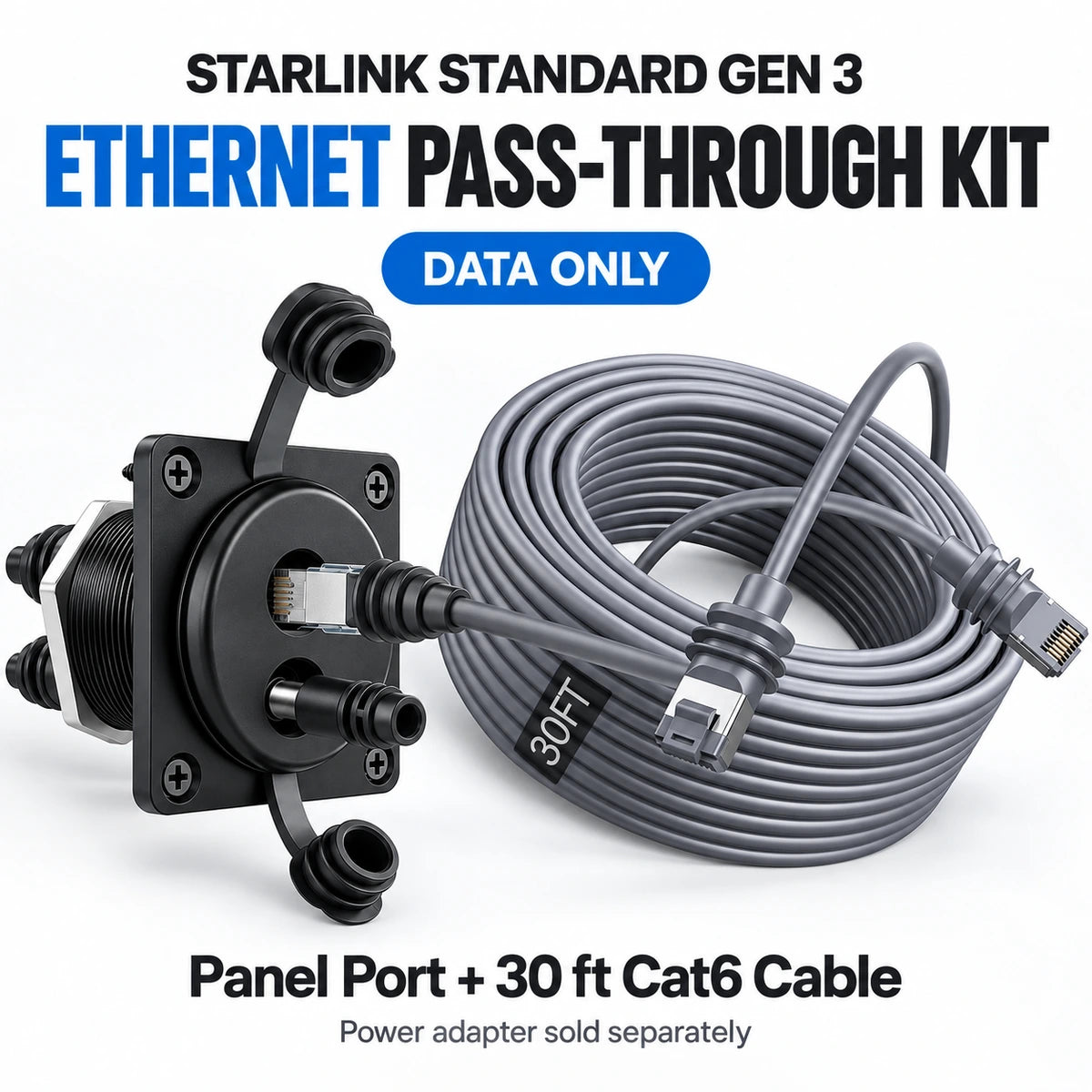
Starlink Standard Gen 3 - Ethernet KitData only

For routing a wired connection from the Gen 3 router through an RV, van, cabin, or equipment panel.

  • Includes the panel port and one 30 ft waterproof Cat6 cable.
  • The kit carries Ethernet data through the RJ45 connection.
  • Continue using the original Gen 3 power supply; a power adapter is not included.
Important: Gen 2 and Gen 3 kit options expand the Ethernet data path only. They do not convert or replace the original Starlink power system.

CLEAN CABLE ROUTING

Close the window. Keep the connection outside.

The panel port creates a fixed handoff point between outdoor equipment and indoor power or networking gear. That helps protect cable jackets, door seals, and connectors from improvised routing.

Clean RV wall entry for Starlink Mini Ethernet and DC power cables

OUTDOOR INSTALLATION

Caps and gaskets protect unused connections.

Weather-conscious designTwo tethered caps cover the RJ45 and DC openings when cables are disconnected.
Panel sealingTwo square gaskets help seal both sides of the mounting surface.
Durable housingAn aluminum body is better suited to fixed outdoor installations than a loose indoor coupler.
Installation note: Weather resistance depends on correct gasket placement, a clean flat mounting surface, fully seated cables, and closed caps when ports are unused.
Weather-resistant Starlink wall pass-through installed on an RV exterior RJ45 and DC panel port with tethered weather caps open and closed

DATA + POWER

Build the route around your actual equipment.

The shielded female-to-female RJ45 coupler supports a clean Ethernet handoff through the panel. The separate DC barrel connection carries power through the same compact assembly. Always confirm cable type, connector dimensions, source voltage, and the power requirements of the connected device before installation.

Cat6 Ethernet wall pass-through application for a fixed Starlink installation Starlink Mini wall pass-through wiring path between outdoor dish and indoor network and power equipment

INSTALLATION

Plan the hole, cable reach, and service access first.

  1. Choose a flat panel area with clearance behind the wall for the threaded body, locking nut, and cable bends.
  2. Measure the 64 mm faceplate and 53.6 mm mounting-hole spacing against the installation location.
  3. Fit the supplied gaskets, tighten the locking nut, and secure the faceplate with all four screws.
  4. Connect and test Ethernet and DC power before sealing or concealing the indoor cable route.
RV boat truck mobile home and camping uses for the AerolinkGear wall pass-through panel

COMPLETE THE CONNECTION

Pair the panel port with the cables and adapters your route needs.

These three products cover the most useful next steps for a fixed or vehicle-based Starlink Mini installation: outdoor Ethernet reach, a wired network handoff, and dependable 12V vehicle power.

QUICK ANSWERS

What to confirm before installation.

Does this panel port power Starlink Mini by itself?

No. It is a pass-through connection, not a power converter. Use a compatible power source and cable that provide the voltage and current required by your device.

Do I need two separate holes for Ethernet and power?

No. The compact body groups the RJ45 data coupler and DC barrel connection into one panel assembly.

Can I install it on an RV, van, boat, or cabin?

Yes, when the panel is flat, strong enough for the mounting hardware, and has sufficient rear clearance. Marine and vehicle installations should also account for vibration, water drainage, and cable strain relief.

Which option should I choose?

Choose Starlink Mini - Panel Port when you need both RJ45 and compatible 5.5 x 2.1 mm DC pass-through connections. Choose the Gen 2 or Gen 3 Ethernet Kit when you need the listed model-specific parts for a data-only wall-entry route while retaining the original Starlink power system.

Which connectors should I check?

For the Mini option, confirm a shielded RJ45 Ethernet connection and a 5.5 x 2.1 mm DC barrel connection. For Gen 2 and Gen 3 kits, the included additions are for Ethernet data; verify your existing router, cable path, and original power equipment before installation.

Why Buy From AerolinkGear

  • Starlink Mini Focused

    Accessories built around mobile Starlink Mini setups.

  • Help Before & After Checkout

    Need help choosing? Contact us before or after ordering.

  • Built for Mobile Internet

    For RV, camping, overlanding, remote work, and backup use.

Customer Reviews From Starlink Mini Setups

See how shoppers use AerolinkGear for power, mounting, travel, and mobile internet.